 Shotlore
Offload: every file read back, from every drive
Copy camera cards, sound cards and whole drives to two or more drives at once. Every file is read back from each drive and compared with the card, an ASC MHL record goes on every drive, and a card is marked Safe to format only when every file is verified on separate drives. Nothing is ever written to a card.
The rules it never breaks
Cards are read, never written to or formatted. On a Mac the card is remounted read-only for the copy where the system allows it.
Each file is written to a temporary name, synced to disk, read back from the drive bypassing the cache, and its checksum matched before it takes its real name. Nothing is ever replaced.
Two folders on one drive are one copy. Safe to format needs the number of verified copies you set, on physically separate drives.
An ASC MHL record with every file's hash goes on each drive, so any tool that reads MHL can prove the copy later. Shotlore reads it back when you add the folder to a job.
A drive that disappears mid-copy stops the queue with a clear message; Resume finishes from where it got to. Closing the window keeps the queue.
By default the card itself is read a second time during verification, so a reader that drops a byte is caught. Turn it down to drives-only when time matters more.
How an offload goes
- Plug in. Cards and drives appear under Plugged in as the computer sees them, with their format and free space. A card goes to Sources by itself; drag your drives onto Destinations, or drop folders from Finder or File Explorer.
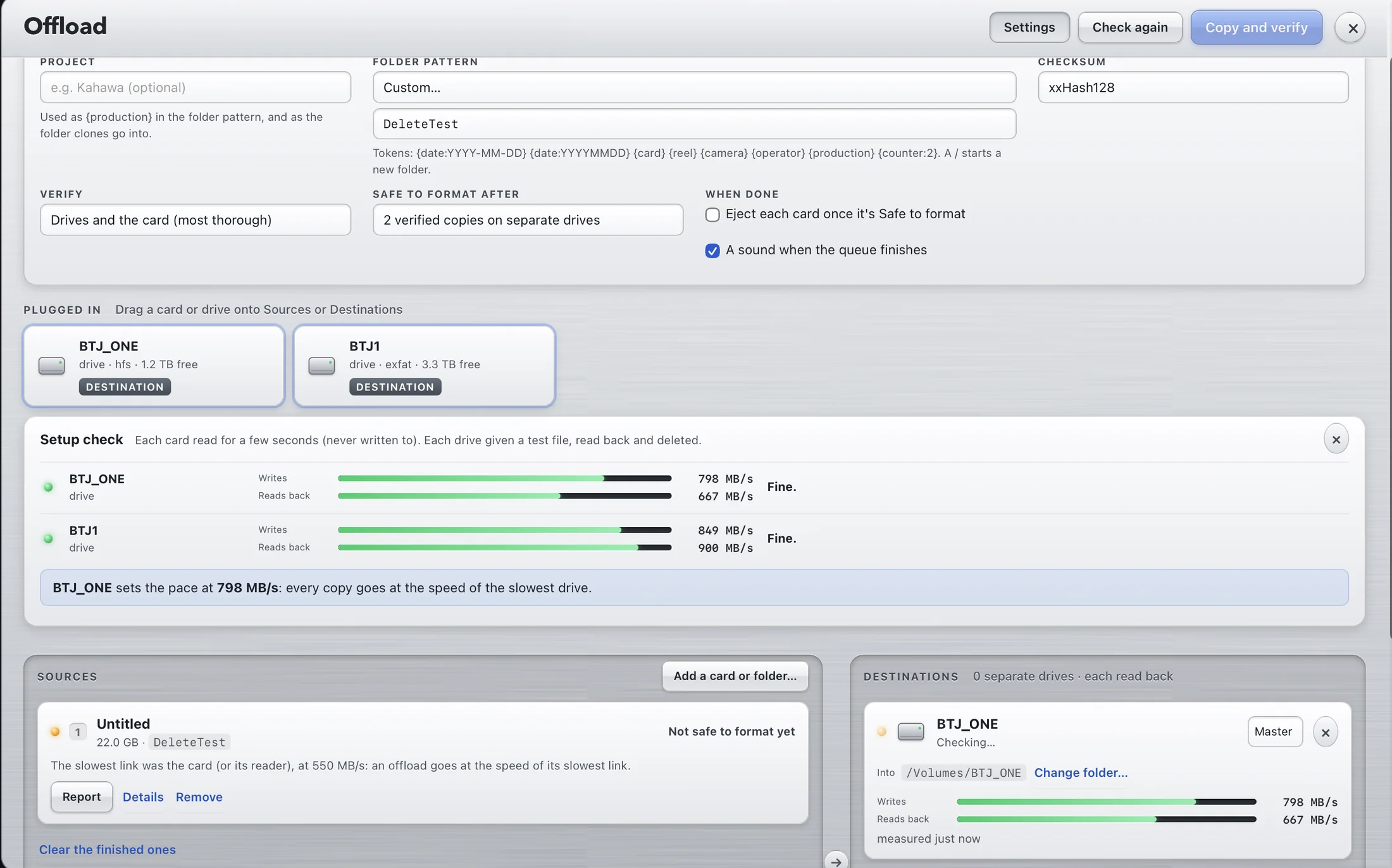
- Check my setup (optional, a few seconds). Shotlore reads a little from each card and writes a test file to each drive, then shows each speed and which one sets the pace, with what to try when a cable or port is slow.
- Copy and verify. One read of the card feeds every drive. Cards copy one after another; a card plugged in while copying joins the queue. Time left comes from the measured speeds and the last minute of copying, with a finish time for the whole queue.
- Safe to format. When every file is verified on separate drives the card's row says so. Format it in the camera. Report opens the transfer report; Add to the job starts tagging the copy.

Check my setup: writes and reads back for each drive, and which one sets the pace.
Named rolls or exact clones
Each source is a Named roll or an Exact clone. Rolls are named by the production pack's convention or your own folder pattern: presets such as Date/card, Project/date/card, Date/camera/card and Project/camera/roll, or tokens like {production}/{date:YYYY-MM-DD}/{card}_{counter:2}, with a "Next card" preview. The camera's make, model and serial are read from the first clip, still or sound file on the card, and the serial names the roll. A clone copies a drive or folder exactly as it is, with no counter. A shooter's drive holding several cards lists the card folders on it, and a drive with no card folders offers Clone the whole drive.

The crew's card log, kept up to date
With Shotlore Field 1.5 on the crew's phones, every card is logged from in camera to offloaded, verified and safe to format (Cards: where's each one? in the camera report). When Shotlore has copied and verified a card, it tells the phone that logged it, at the next Wi-Fi sync or through the production's shoot folder, and the phone's log moves on by itself. Offload › Cards shows the whole crew's card board with the cards verified on this computer, flags a card marked formatted on a phone that this computer never verified, and the wrap report lists the cards the same way. A card arriving for offload shows what Field says about it, and warns if the log already says verified or formatted. Field's evidence for a card is read from a month of days, so a card put in days earlier is still matched.
Setting up a production's first shoot, from the shoot pack to Safe to format and the wrap report: Your first shoot with Shotlore, step by step.
Checksums
Every file is hashed as it is read from the card, and the same hash is checked on every drive after the copy. Pick the algorithm in Settings; the choice is written into the ASC MHL record, so whoever reads the MHL later knows what to recompute.
| Checksum | When to choose it |
|---|---|
| xxHash64 | Fast, the usual choice. Keeps the hash off the critical path on fast readers and SSDs. |
| xxHash128 | Same speed class, a longer hash for productions that ask for it. |
| MD5 | Slower; some post houses and delivery specs ask for it by name. |
| SHA-1 | Slower; for a spec that requires it. |
All four are ASC MHL hash formats, so the record works with other MHL-aware tools whichever you choose. The verify level is separate: Drives and the card re-reads the card during verification as well as every drive; Drives only trusts the first read of the card.
Settings
| Setting | Choices |
|---|---|
| Project | Used as {production} in the pattern and as the folder clones go into |
| Folder pattern | Presets, the card's own name, or custom tokens |
| Checksum | xxHash64 (fast, the usual choice), xxHash128, MD5 (slower; some post houses ask for it), SHA-1 (slower) |
| Verify | Drives and the card (most thorough), or drives only |
| Safe to format after | 1 to 4 verified copies on separate drives |
| When done | Eject each card once it's safe (only with no warnings); a sound and a Dock or taskbar bounce when the queue finishes |
A production pack's naming and rules take priority over these settings, and the panel says so.
Offload is optional
Shotlore never makes you use it. On first run it asks how your cards are copied: OffShoot, Silverstack, ShotPut Pro, YoYotta, another tool, by hand, or Shotlore. Whatever you choose, Shotlore reads the MHL records those tools write, so every card still shows as verified or not when you add the copies to a job. A production pack can require a particular tool.
Questions
Which drives, formats and cables should I use?
Two fast SSDs, each formatted for whoever has to read it, each plugged straight into the computer with a cable rated for its speed. The detail, with measured numbers, is on drives for offloading.
What happens if a copy fails?
The queue stops with a message naming the drive or file. Nothing on the card has changed, and nothing on the drives has been replaced: a file that didn't verify never took its real name. Fix the cable or drive and press Resume.
Does it work on Windows?
Yes: the same engine and the same screen. Some card readers on Windows can't be ejected by an app, so Shotlore tells you to use Safely Remove Hardware for those. Both platforms are in beta while we test on more readers and cards.
Can I offload without a Shotlore job?
Yes. Offload is on the start screen and the sidebar whether or not a job is open, and the transfer report and MHL records are on the drives, not in the job.
What's in the report?
An HTML and CSV transfer report on every drive and in Shotlore's history, alongside the ASC MHL record: what was copied, where, how fast, and whether the card was judged safe to format.
Free 14-day trial, no card needed: get a trial key. Found a reader or card it doesn't like? hello@shotlore.app.