 Shotlore
Installing Shotlore
Installing on a Mac
- Download Shotlore and open Shotlore.dmg from your Downloads.
- Drag Shotlore onto the Applications folder in the window that opens.
- Open Shotlore from Applications. The first time, macOS asks whether to open an app downloaded from the internet: click Open.
- Paste your licence or trial key. No key yet? Get a free 14-day trial. Then the manual's Getting started takes you through your first job.
Shotlore is signed with our Apple Developer ID and checked by Apple (notarised), so on most Macs that's all there is to it.
If your Mac says it "was not downloaded from the App Store"
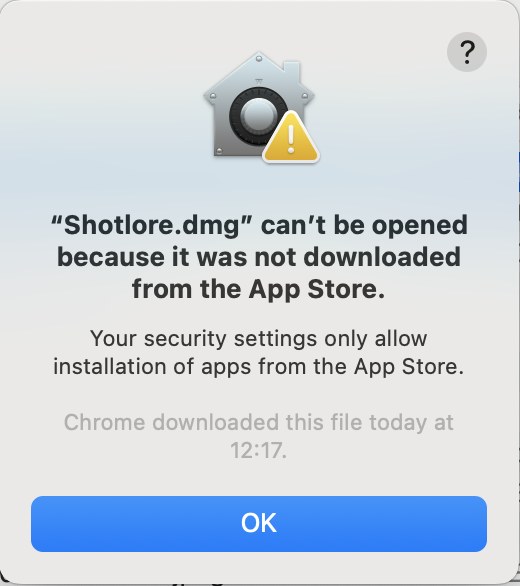
Click OK, then choose one of these.
Either: allow apps from known developers (recommended)
This lets you open apps from developers Apple has identified and checked, as most Macs are set up. Apple still blocks anything unsigned or known to be harmful.
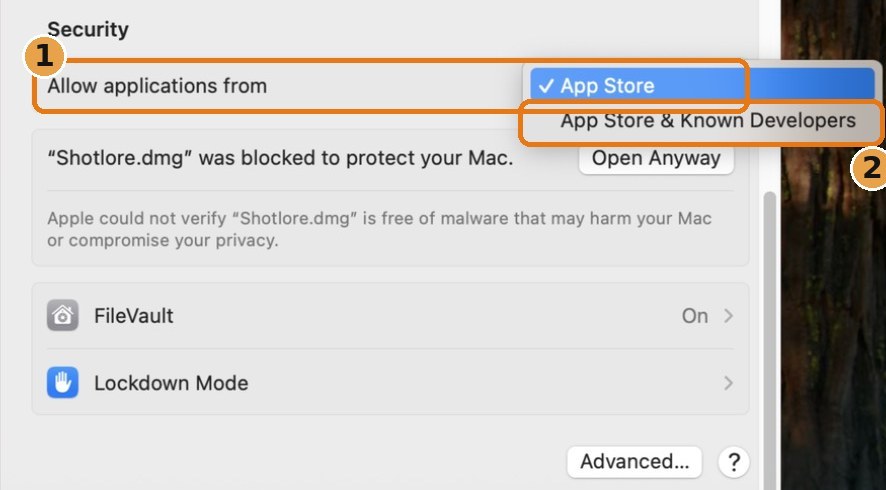
- Open System Settings (Apple menu › System Settings) and click Privacy & Security in the sidebar.
- Scroll down to Security. Next to Allow applications from (1), choose App Store & Known Developers (2). Your Mac asks for your password.
- Open Shotlore.dmg again and carry on with step 2 at the top of this page.
Or: keep App Store only, and allow just Shotlore
- Straight after the message, open System Settings › Privacy & Security and scroll down to Security.
- Next to "Shotlore.dmg" was blocked to protect your Mac, click Open Anyway and enter your password.
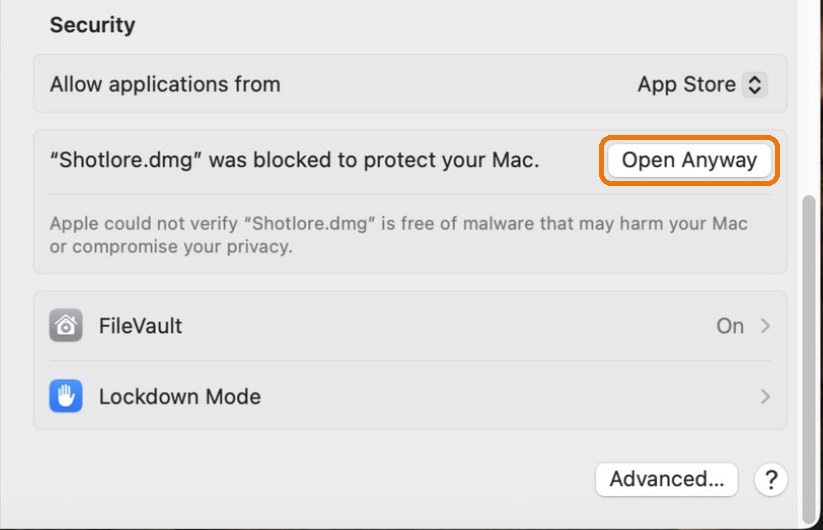
- Drag Shotlore to Applications and open it. When the Mac blocks the app itself, go back to the same place and click Open Anyway once more. You only do this the first time.
Installing on Windows (beta)
- Download Shotlore for Windows and open Shotlore_…_x64-setup.exe from your Downloads.
- If Windows SmartScreen says it protected your PC, choose More info › Run anyway. The installer and every program in it are code-signed, but SmartScreen can still show this for a new publisher until enough people have installed it.
- Shotlore is code-signed, so it also runs on PCs where Windows 11's Smart App Control is on.
- Shotlore installs for your Windows account. No administrator password is needed.
- Open Shotlore and paste your licence or trial key. The same key works on Mac and Windows. Then the manual's Getting started takes you through your first job.
- The first time Shotlore looks for a phone running Shotlore Field, Windows Firewall may ask once: tick Private networks and allow. If the phone never appears, type the address Field shows instead.
Your Gemini key is kept in Windows Credential Manager, protected by your Windows sign-in.
Shotlore Field on Windows. Get your days straight from the phone over Wi-Fi (Position track › Get days from a phone…), or install iCloud for Windows from the Microsoft Store, turn on iCloud Drive, and in Shotlore choose Position track › Choose folder… and pick Shotlore Field's folder. With Field for Android, pick the folder it syncs to.
Free keywords on the computer and People shown work on Windows with the optional on-device picture model (a one-time download of about 200 MB). Not on Windows yet: Touch up and JPEG export, Quick Look, Final Cut Pro export (Final Cut is Mac-only) and the OffShoot hand-off. Shotlore checks for new versions when it starts and offers to install them.
Other messages
"Shotlore is an app downloaded from the internet. Are you sure you want to open it?"
That's macOS asking the first time any downloaded app opens. Click Open.
"Apple could not verify Shotlore is free of malware"
You'll see this wording in the Security section while the Mac is set to App Store only, even for checked apps. Use either option above.
Updates
Shotlore checks for a newer version when it starts and offers to install it; your jobs, keys and settings are kept. You don't need to repeat anything on this page for updates.
Still stuck?
Email hello@shotlore.app with a screenshot of the message (Mac: ⇧⌘4, then drag over it; Windows: Win+Shift+S).