 Shotlore
Shotlore Field: a free toolkit for the whole crew
Over 20 tools for working in the field, in one free app for iPhone, iPad and Android: the day's GPS track, a clock for every camera, the sun, moon and tides, safety check-ins, drone, camera and sound logs, permits, releases and more. No account, no tracking, and almost everything works with no signal.
Free for everyone on the crew · No account · iPhone, iPad and Android · Android: on Google Play · iPhone and iPad: beta through TestFlight (how to install)
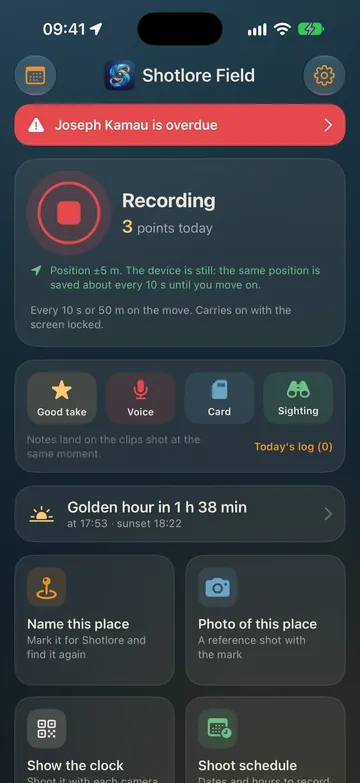
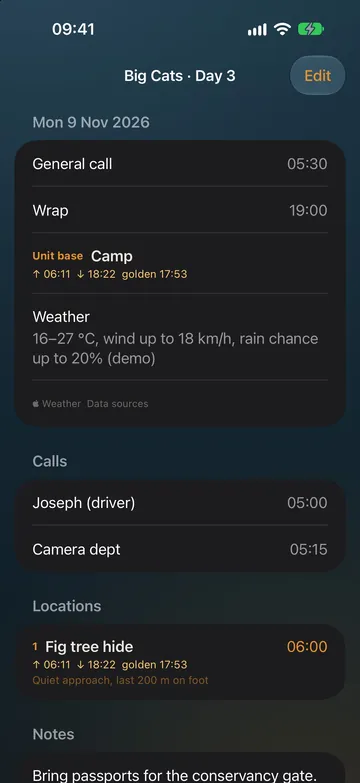
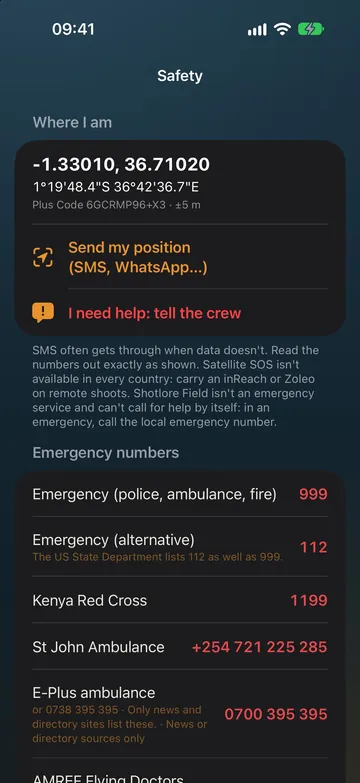
New in 1.6: crew online on iPhone and Android together (check-ins, notices, day plans and an opt-in live crew map), Find for the sun and moon at a bearing, eclipses and meteor showers, sun alerts, a home-screen widget, offline maps on Android and hints and tips. Everything that changed.
What's in it, free
Pick your role the first time you open it, from producer to sound recordist to ranger, and Field shows the tools that job uses. Everything else is one switch away. It works on its own; with Shotlore on a Mac or PC, the day it records lands on the rushes.
Record the day
A position every few seconds or metres, with the screen off. Name a place with one tap, and find your way back on a satellite map with a compass guide.
The clock
A full-screen code of the exact time. Photograph it with each camera, or film it for a few seconds, and Shotlore sets every camera's clock.
Sun, moon, tides and weather
First and last light, golden and blue hour, moon phase, the night sky and tides from about 3,000 gauges, worked out with no signal. Weather with a drone verdict. The sun's and moon's paths through the camera, your real skyline traced for true sunrise and sunset, Find, eclipses and meteor showers, and a home-screen widget.
Camera tools
Depth of field, ND filter, shutter angle, timelapse and card capacity. Lock what must stay put and the free value follows.
Light and power
Flicker-safe shutters, light left today, power, cable runs and generators, a data and offload planner, heat stress, and a battery board for V-mounts and lights.
Safety and check-ins
Your position as a Plus Code, I need help, check-ins with overdue alerts, an emergency card for a medic, nearest hospitals and airstrips, and risk assessments.
Day plans and shot lists
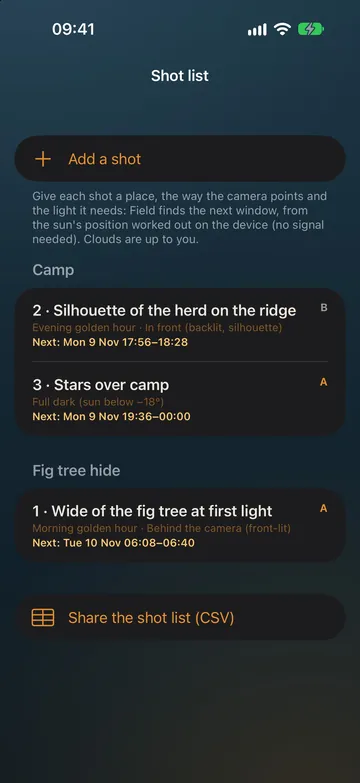
A light call sheet with sun and weather filled in and "Got it" receipts, and a shot list sorted by when the light you need comes round.
Drone
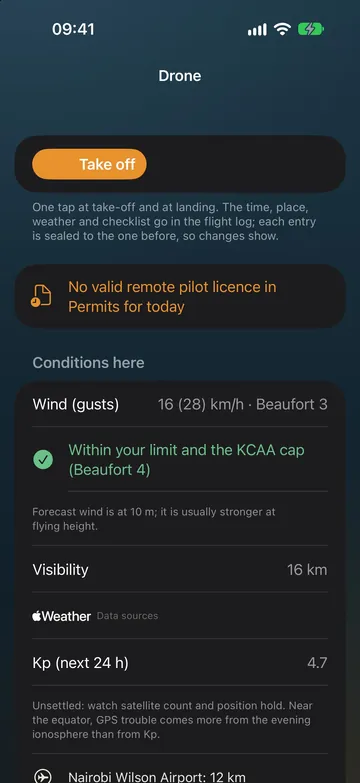
A sealed flight log, pre-flight checklists, aircraft and batteries, and wind checked against your limit.
Camera and sound logs
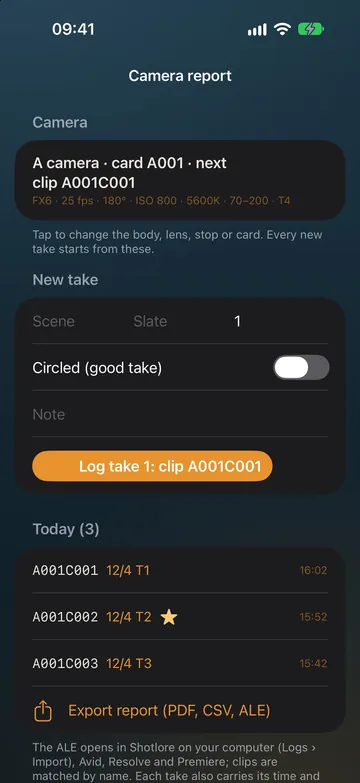
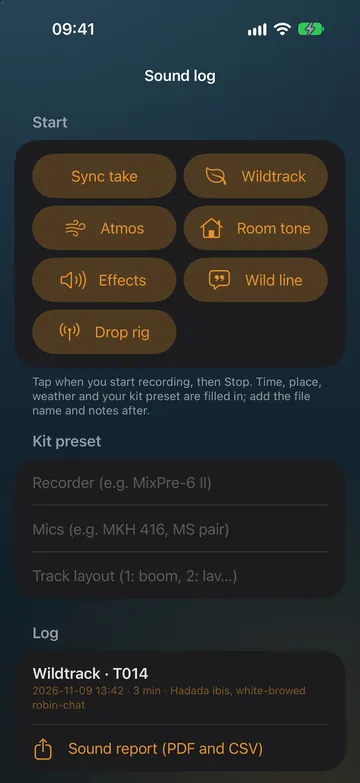
Camera reports with card custody (Cards: where's each one?), sound logs with timecode and a radio frequency plan.
Scout reports
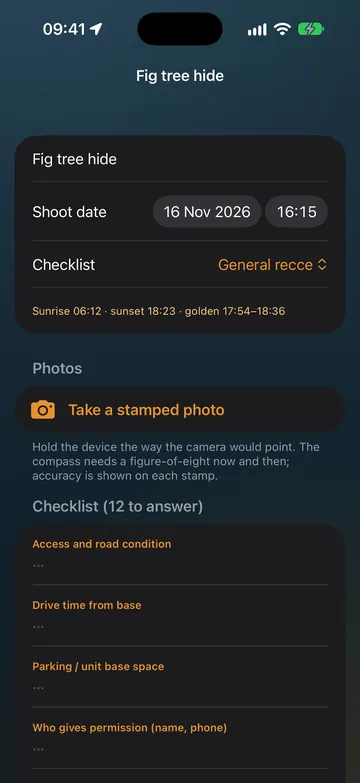
Stamped photos with position, bearing, tilt and the sun, recce checklists, and a PDF to share.
Wildlife
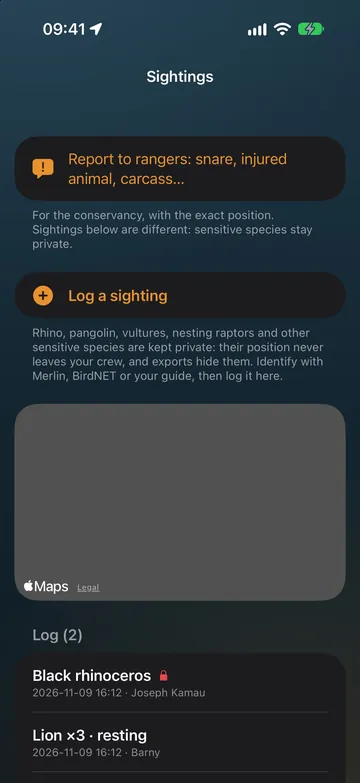
Sightings with sensitive species kept private, camera traps and reports to rangers.
Permits and paperwork
Permits shown bright at the gate with expiry reminders, releases signed on the phone, receipts and a carnet-ready kit list.
Country packs
Checked emergency numbers, drone and permit rules and airspace for the country you're in, offered when you arrive. Twelve African countries so far.
Crew shoots
The production invites the crew; each person's track, places and logs reach the office labelled with whose they are. Publishing shoot packs to a crew comes with a Shotlore Company licence.
The everyday tools in more detail
- Record the day. Start recording and pocket the phone. It keeps a position every few seconds or metres and carries on with the screen off.
- Name this place. One tap, a name and a size; everything shot there gets that name as its location in Shotlore.
- Show the clock. A full-screen code of the exact time. Photograph it with each camera, or film it for a few seconds, and Shotlore on the computer sets every camera's clock offset from the photo.
- Find your way back. The day's trail on a satellite map, every named place, and a compass guide that works with no signal.
- Sun, moon, tides and weather. Sunrise, sunset, golden and blue hour, the moon, the night sky and tides, all worked out on the device, and the weather with a drone verdict (Apple Weather on iPhone, MET Norway on Android when switched on). Through the camera, the sun's and moon's paths over the real scene; trace the skyline once for the real sunrise and sunset behind the hills; Find shows when the sun or moon sits at a bearing and height; eclipses and meteor showers for where you are; and a Sun & moon home-screen widget.
- Shot log. Good takes, voice notes, card changes and sightings, which Shotlore attaches to the clips shot at that moment.
- Cards: where's each one? The card log follows each card from in camera to offloaded, verified and safe to format. When Shotlore on the computer has verified a card, it tells the phone, and the log moves on by itself (Field 1.5 with Shotlore 0.7.9).
- Shoot schedules. Set a shoot's dates and hours, and recording keeps to those hours; between them, location is off.
Step-by-step instructions for every tool are in the Field guide.
The crew's working kit
Pick your role on first run and Field shows the tools that job uses; the rest are a switch away. The version each arrived in is marked.
Your role, your tools 1.2
Pick from 14 roles, from producer to sound recordist to ranger, and Field shows the tools that role uses. Anything else is one switch away.
How it worksCrew shoots 1.1
The producer invites the crew with a link; each person's track, places and shot log reach the computer already labelled with whose they are.
Join a crewDay plans and shot lists 1.2
A light call sheet with sun and weather filled in and "Got it" receipts, and a shot list sorted by when the light you need comes round.
Day plan · Shot listSafety 1.2
Your position in Plus Code, I need help, check-ins with overdue alerts, an emergency card for a medic, nearest hospitals and airstrips, and risk assessments.
SafetyPermits and drone 1.2
Permits shown bright at the gate with expiry reminders; a sealed drone flight log with checklists, batteries and wind limits.
Permits · DroneCamera and sound logs 1.2
Camera reports with card custody, sound logs with timecode and a radio frequency plan, the battery board and power tools.
Camera · SoundWildlife and paperwork 1.2
Sightings with sensitive species kept private, camera traps, reports to rangers, releases signed on the phone, receipts and a carnet-ready kit list.
Wildlife · PaperworkCountry packs 1.3
Checked emergency numbers, drone and permit rules and airspace for the country you're in, offered when you arrive. Twelve African countries so far.
Country packsShare with Shotlore 1.4
Shotlore on a Mac or PC on the same Wi-Fi finds the phone, pairs with a code and copies the days straight off it. No cloud, no cable. Works for Android too.
How it worksShoot sync 1.4
A production's own shared folder carries every crew member's days to the office, with the pack, the client's places and a security level the production chooses.
The levelsShare with Shotlore and shoot sync 1.4
Three ways a day reaches the office, and all three work for iPhone and Android alike. Share with Shotlore (Days › Share with Shotlore): while that screen is open, Shotlore on a Mac or PC on the same Wi-Fi, or on the phone's hotspot, finds the phone, asks for the six-digit code once, and then copies every new day, reference photo and voice note with one click; clients' named places come back the other way. The shoot folder: a production shares one folder in its own Google Drive, OneDrive or iCloud Drive; each crew member opens the shoot pack, picks their folder once, and Field writes the day there whenever it has signal. Send to production: a bundle file for WhatsApp, AirDrop or email when there's neither. Shotlore reads all three the same way, and each person's day is their own track.
Three levels a production can choose
The coordinator sets the level when making the shoot pack; the phones and Shotlore enforce it, and Shotlore prints a security sheet for the client saying what was chosen and who enforces each control.
Open
The shared folder, Share with Shotlore and bundles all allowed. Every file is signed by the phone that wrote it, so Shotlore takes nothing that was changed on the way. Sensitive places are rounded or withheld in anything shareable. The folder's sharing is the access control.
Need-to-know
Each crew member sees only their own days, the client's places and the pack. Send my day and the share sheet are off for the shoot; photos and voice notes stay on the phone unless the production allows them. Field asks for the phone's lock before opening the shoot, and blocks screenshots on Android.
Locked
Everything in Need-to-know, and every file is encrypted on the phone before it leaves, with a shoot key the production holds and that only travels in person, over Share with Shotlore. The production can have days deleted from phones once its computers hold them, and a device removed from the shoot forgets it. Lost key, lost shoot: nobody, including us, can read the files without it. A production can also switch the cloud folder off entirely.
What no level can promise: a crew member can photograph their screen or write things down; a phone compromised at the operating-system level is open; iPhone doesn't block screenshots; a phone that goes offline before it is removed keeps what it had until it returns; and the production's computers are as safe as their disk encryption and their users. The security sheet says so, because a client's security lead will ask.
Using it with Shotlore on your Mac or PC
The quickest route on any phone is Share with Shotlore over Wi-Fi. On an iPhone or iPad with a Mac, iCloud Drive does it without any taps:
- On the iPhone or iPad, sign in to iCloud with the same Apple Account as your Mac, and leave iCloud Drive sharing on in Shotlore Field's Settings.
- Record your shoot days. Each day is saved to iCloud Drive › Shotlore Field as it goes.
- Open the job in Shotlore on the Mac or PC. It offers the Field days that match the job: choose Use them.
No iCloud? Use Share with Shotlore, or open a day in Days and send it as a GPX file by AirDrop, then add it in Shotlore with Add GPX files.
On Android
Shotlore Field for Android records the day, names places, keeps the shot log and the card log, shows the clock, works out the sun, moon and tides, and has the camera tools and most of the crew tools (see what differs). It has no iCloud, so the day reaches the Mac or PC through Share with Shotlore over Wi-Fi, the production's shoot folder, or as a file: in Days, send it by WhatsApp, Gmail, Drive or Quick Share (or save it), then add it in Shotlore under Files & track. Crew without the app can still mark takes at shotlore.app/mark in any phone browser.
iPad
Shotlore Field runs on iPad too. For recording a track, use an iPad Wi-Fi + Cellular model, which has GPS; a Wi-Fi-only iPad estimates its position from nearby Wi-Fi networks, which is usually too rough to save as a track point, and the main screen says so.
Privacy
No account, no analytics, no tracking. Your days stay on your device and, if you choose, in your own iCloud Drive or the production's own shared folder. Weather, map place names and some voice-note transcription ask Apple for an answer in real time (on Android, weather asks MET Norway, when switched on). From 1.3, country packs download from shotlore.app; the country is worked out on the phone and nothing about you is sent. From 1.4, Share with Shotlore talks to the computer directly over the local network, and if something goes wrong Field can draft a problem report for you to read and send to hello@shotlore.app from your own mail app; nothing is sent by itself. The details are in the privacy policy and on the security page.
Help
The Field guide explains every tool step by step. Questions, problems or ideas: email hello@shotlore.app or suggest a feature. The tracking guide explains recording a good track, and shotlore.app/clock shows the same clock in any browser.